




















An Introduction to Agentic Workflows You Need to Know

Imagine an AI that doesn’t just answer questions but takes action. It breaks down complex tasks, makes decisions autonomously, and completes multi-step processes without constant human intervention. This is the concept behind agentic workflows, one of the most transformative developments in AI-driven user experience design.
As a UI/UX designer or product manager, understanding agentic workflows is becoming essential. These systems are reshaping how users interact with technology, moving from passive interfaces where users request information to active systems that accomplish goals on behalf of users.
In this guide, we’ll explore what agentic workflows are, how they differ from traditional AI interactions, and how to design interfaces that effectively leverage them.
What Are Agentic Workflows?
An agentic workflow is an AI-driven process in which a Large Language Model (LLM) autonomously plans, executes, and adapts a sequence of actions to complete a complex task — using tools (APIs, search, code execution), memory, and reasoning — without requiring a human to direct each step. Unlike single-prompt AI, agentic systems break goals into sub-tasks, execute them, evaluate results, and adjust their approach dynamically.

In simple terms– An agentic workflow is a system where an AI agent operates with a degree of autonomy to accomplish a defined goal. Rather than responding to individual user queries, the agent can plan, execute, and modify its approach across multiple steps and decisions.
Think of it like this: Instead of asking ChatGPT each question individually about a business research task, an agentic AI workflow would accept the goal “Research our top 10 competitors and create a competitive analysis document,” then autonomously gather information, organize data, and produce the final output with minimal user intervention.
Key characteristics of agentic workflows include:
-
- Goal-oriented behavior: The agent works toward a defined objective rather than responding to isolated requests
- Multi-step planning: The agent breaks complex tasks into smaller steps and executes them in sequence
- Autonomous decision-making: The agent makes choices about which tools to use and how to proceed
- Adaptability: The agent adjusts its approach based on results and feedback
- Tool integration: The agent can access and use multiple systems (databases, APIs, applications) to complete tasks
How Agentic Workflows Differ from Traditional AI Interactions
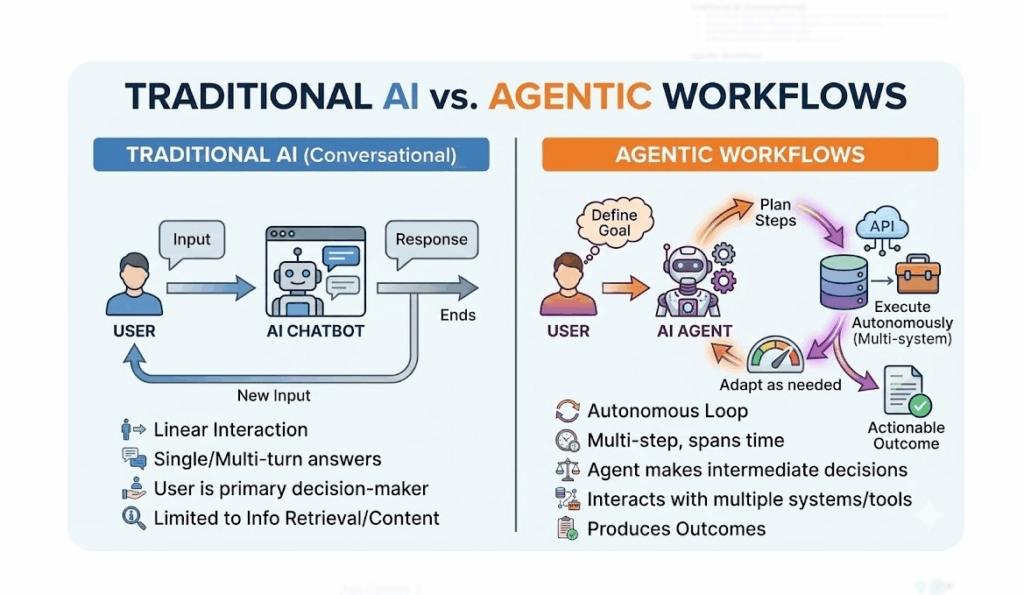 Traditional AI (Conversational)
-
- User provides input → AI generates response → Conversation ends or continues with new input
- Single-turn or multi-turn interactions focused on answering questions
- User remains the primary decision-maker
- Limited to information retrieval or content generation
Agentic Workflows
-
- User defines a goal → Agent plans steps → Agent executes autonomously → Agent adapts as needed
- Multi-step processes that can span hours or days
- Agent makes intermediate decisions within defined parameters
- Can interact with multiple systems, databases, and tools
- Produces actionable outcomes beyond information
The Architecture of Agentic Workflows
 Understanding the basic structure helps you design better interfaces around these systems.
-
- Goal Definition: The user sets the objective. This might be conversational (“Help me plan a marketing campaign”) or structured (uploading documents for analysis).
- Planning Module: The agent breaks the goal into sub-tasks and determines the sequence of actions needed.
- Tool Integration: The agent accesses necessary tools—APIs, databases, software applications—to gather information and take action.
- Execution Loop: The agent performs actions, observes results, and determines the next step. If something doesn’t work, it adapts.
- Validation & Feedback: The agent checks its progress against the goal and allows for user feedback to refine the approach.
- Delivery: The agent presents completed work or actionable insights to the user.
Real-World Applications of Agentic Workflows
-
- Customer Support Automation: An agentic workflow can handle complex support tickets by accessing customer history, checking inventory, processing refunds, and escalating to humans only when necessary.
- Research and Analysis: An agent can gather data from multiple sources, synthesize findings, identify patterns, and produce comprehensive reports with citations.
- Project Management: An agent can track project tasks, identify blockers, allocate resources, schedule meetings, and send updates to stakeholders autonomously.
- Content Production: Rather than editing individual pieces, an agent can research topics, create multiple content pieces, format them, and schedule publication across platforms.
- Software Development: AI agents can write code, run tests, fix bugs, and even refactor components with human developers managing the overall direction.
Designing UI/UX for Agentic Workflows
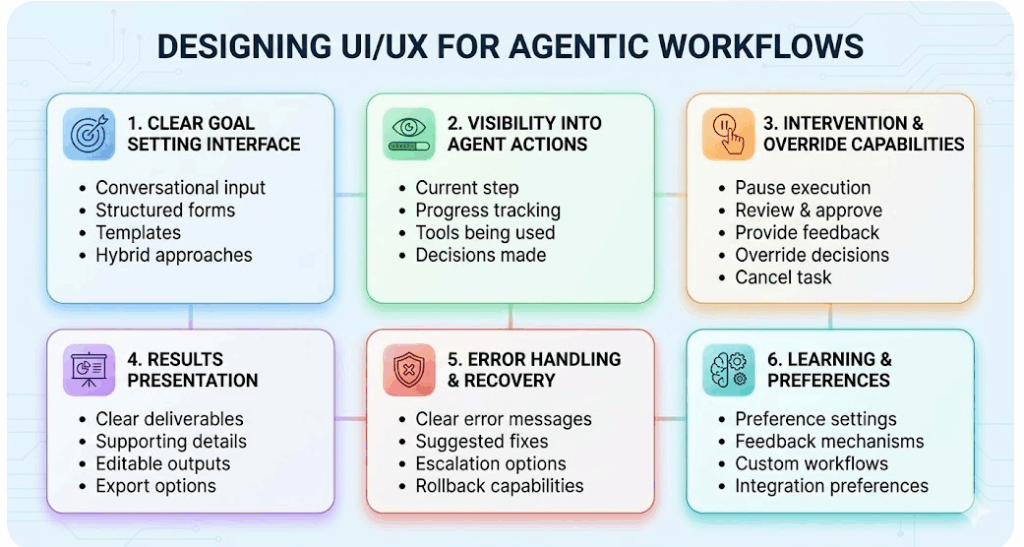 1. Clear Goal Setting Interface
Users need a clear way to define their objective. This might be through:
-
- Conversational input: “What would you like me to do?”
- Structured forms: Breaking complex requests into fields
- Templates: Pre-built workflows for common tasks
- Hybrid approaches: Combining conversation with additional specification
Make it easy for users to refine their goal until it’s specific enough for the agent to act effectively.
2. Visibility Into Agent Actions
Users should understand what the agent is doing. Design interfaces that show:
-
- Current step: What is the agent working on right now?
- Progress: How far through the task is the agent?
- Tools being used: What systems is the agent accessing?
- Decisions made: What choices did the agent make and why?
This transparency builds trust and helps users identify when the agent has gone off track.
3. Intervention and Override Capabilities
Even when agents work autonomously, users need control. Design clear pathways to:
-
- Pause execution if something doesn’t look right
- Review and approve major actions before the agent proceeds
- Provide feedback to adjust the agent’s approach mid-task
- Override decisions when user judgment should take precedence
- Cancel if the task is going in the wrong direction
4. Results Presentation
How you present completed work matters. Ensure:
-
- Clear deliverables: What was accomplished?
- Supporting details: What data or reasoning backs this up?
- Editable outputs: Can users modify the results easily?
- Export options: Can users move this to other tools?
- Refinement prompts: How can users request changes?
5. Error Handling and Recovery
Agents will encounter obstacles. Design for graceful failure:
-
- Clear error messages: Explain what went wrong in plain language
- Suggested fixes: Offer paths forward (retry, adjust goal, provide more info)
- Escalation options: When should a human take over?
- Rollback capabilities: Can users undo agent actions if needed?
6. Learning and Preferences
Over time, agents should adapt to user preferences:
-
- Preference settings: Let users specify how they want the agent to operate
- Feedback mechanisms: Allow users to rate agent performance
- Custom workflows: Enable power users to define agent behavior
- Integration preferences: Which tools and systems should the agent use?
Design Patterns for Agentic Interfaces

-
- The Progress Dashboard: Display real-time information about what the agent is doing, including current task, completion percentage, and any blockers. Include a timeline showing completed steps.
- The Approval Gate: Before major actions (spending budget, contacting customers, making changes), require user approval. This maintains control while preserving automation benefits.
- The Feedback Loop: After task completion, invite users to rate the result and provide specific feedback. Use this to improve future executions.
- The Command Center: Provide a command interface where power users can issue new goals, pause current agents, adjust parameters, and monitor multiple concurrent workflows.
- The Transparent Reasoning View: Show users the agent’s reasoning: “I’m accessing your CRM because you need customer data,” or “I’m creating a summary because you requested a report.”
Best Practices for Agentic Workflow Design
-
- Start with clear success criteria: How will you know when the agent has succeeded? Define this upfront so both users and agents understand the goal.
- Build in checkpoints: Rather than fully autonomous workflows, consider hybrid approaches with human review at critical junctures.
- Test with realistic data: Prototype with actual user data and scenarios to identify edge cases where the agent might struggle.
- Design for partial success: Agents won’t always complete tasks perfectly. How do you handle 80% completion? Can users easily finish the remaining 20%?
- Maintain user agency: Even highly automated systems should feel like tools the user controls, not replacements for user judgment.
- Plan for monitoring: How will you track agent performance? Implement dashboards and analytics to understand where agents succeed and fail.
Common Challenges and Solutions
-
- Challenge: Users don’t trust autonomous actions
Solution: Implement mandatory approval gates for significant actions, maintain transparency about what the agent will do, and provide clear undo options. - Challenge: Agents misunderstand ambiguous goals
Solution: Use conversational AI to clarify goals before planning, ask confirmation questions, and provide example goals. - Challenge: Agents operate too slowly for time-sensitive tasks
Solution: Implement fast-track modes, allow parallel execution of independent tasks, and design for real-time updates. - Challenge: Integration complexity becomes overwhelming
Solution: Start with a few reliable integrations, build API abstractions to simplify tool access, and abstract technical details from users.
- Challenge: Users don’t trust autonomous actions
The Future of Agentic Workflows
As agentic workflows become more sophisticated, we’ll see:
-
- Multi-agent systems: Multiple specialized agents collaborating on complex projects
- Long-running agents: Tasks that span weeks or months with periodic human check-ins
- Predictive planning: Agents that anticipate future needs and take proactive steps
- Natural interaction: More conversational, intuitive ways to direct agents
- Industry-specific agents: Specialized agents for healthcare, finance, creative work, and more
Agentic workflows represent a fundamental shift in how humans and AI collaborate. Rather than treating Artificial Intelligence (AI) as a tool for answering questions, we’re moving toward AI as a capable partner that can plan, execute, and accomplish goals.
 For UI/UX designers, this means understanding not just how to present information, but how to orchestrate complex autonomous processes while maintaining user control and trust.
By applying the principles and patterns discussed in this guide, you can design interfaces that unlock the full potential of agentic workflows while keeping users in the driver’s seat.
The future of product design isn’t about replacing humans with AI, it’s about designing systems where humans and intelligent agents work together seamlessly to accomplish more than either could alone.
Key Takeaway
This introductory article explains agentic workflows for designers and product managers — the fundamental shift from AI that answers questions (generative) to AI that completes tasks (agentic). Covered concepts include: the components of an AI agent (LLM brain, tools, memory, planning), how the ReAct (Reasoning + Acting) framework works, multi-agent orchestration (multiple specialized agents working on sub-tasks), the role of human-in-the-loop checkpoints, and practical enterprise use cases (automated research reports, multi-step customer onboarding, supply chain exception handling).
This article was originally published on the Kernshell blog. Read the full version on Medium: An Introduction to Agentic Workflows